Towards Fully Automated Systematic Reviews 2
Continuing on building the ultimate tool for systematic reviews. Switching to LangGraph.
While working on a new systematic review, I realized I needed a more advanced and thorough workflow, with multiple stages like search, screening, extraction, and validation. To make things smoother and more automated, I started thinking about restructuring the whole pipeline as a multi-agent system using LangGraph.
Here’s is a diagram of the top-level LangGraph workflow.
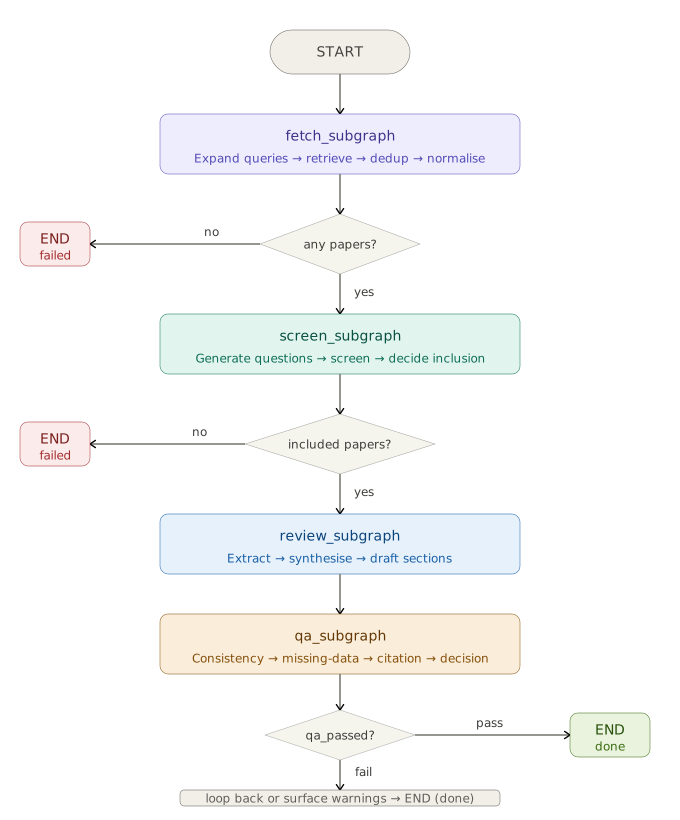
Complete Pipeline
🔍 Fetch
Given an initial search query, an LLM expands it into multiple related queries to improve recall. These queries are then used to retrieve papers from multiple sources: PubMed Central (PMC), arXiv, and Semantic Scholar.
The retrieved results are:
- Deduplicated
- Normalized into a consistent format
🧹 Screen
At this stage, the system applies inclusion and exclusion criteria based on the PICO framework (Population, Intervention, Comparison, Outcome).
The pipeline:
- Generates screening criteria dynamically
- Evaluates abstracts against these criteria
- Produces an inclusion/exclusion decision
This automates one of the most time consuming steps in systematic reviews.
📖 Review/Extract
Each paper is processed and transformed into a structured representation. The system:
- Extracts key information (e.g., objectives, methods, results)
- Identifies research gaps
- Synthesizes summaries across studies L- inks every extracted insight to a supporting quote from the original text
Here we ensure both structure and traceability of extracted knowledge.
🧪 QA
To check reliability, a final QA step validates the outputs:
- Verifies that extracted quotes actually exist in the source text
- Measures citation coverage (how well claims are supported by evidence)
- Flags hallucinations
This step is critical for trustworthiness.
Flexible by Design
This system is not limited to running only as one large end-to-end workflow. The pipeline is exposed through a CLI, which gives users control over how they want to run it. To keep results organized and reusable, every run is saved in a checkpoint and the pipeline saves outputs from each stage separately.
Users can choose whether to run:
- the full pipeline
- only fetch
- only screen
- only extract
- only synthesize
- only qa
For example, a you may want to only retrieve papers for a new topic, resume a previous run from a checkpoint, or run QA on already extracted results without repeating the earlier steps.
🛠 Tech Stack:
Langraph: for multi-agent workflowsPydantic: to validate at the field and model levelOpenAI GPT-4: to screen, and extract structured insights
🛠 Supporting Databases:
PMCSemantic ScholarArXiv
🧑💻 Repo Is Loading
Current tool works as a CLI.